


Garden Planner by Fryd
3.910.00 Reviews
App Specs
- Version
- 4.5.5
- Updated On
- License
- Free
- Downloads
- 100,000+
- Developer
- Fryd GmbH
- Categories
- House & Home
- Platform
- Android
Screenshots
 Analysis by AppCompare
I like garden-planning tools most when they help me make a few practical decisions before I buy seeds or start digging. A sketch can reveal that a sunny bed is already spoken for, or that a tempting crop will leave no room for the herbs I use every week. That is the kind of everyday problem Garden Planner by Fryd is meant to help with: it gives vegetable gardeners a place to organize a growing space and think through what to plant.
What I would decide before downloading
The useful question is not whether an app can make a garden look tidy on a screen; it is whether its planning approach matches the way you garden. If you grow several vegetables in a defined plot, want to compare possible layouts, and appreciate guidance while choosing plants, Fryd’s focus should make sense. If you only keep a couple of pots on a balcony, a notebook or a simple notes app may be quicker than setting up a dedicated plan.
I would also be clear about what I want help remembering. A plan can bring structure to a season, but it cannot make a shaded spot sunny, improve poor soil by itself, or replace checking the weather and the plants in person. I see the app as a planning aid rather than an automatic gardening solution. That distinction matters: it is most useful when I’m willing to make decisions and then adapt them as real conditions change.
Fryd GmbH makes this free House & Home app, which is rated for Everyone and has an average rating of 3.9 from around 1.8K ratings. It has passed 100K installs, and its current version is 4.5.5. Those figures suggest it has found an audience among home growers, but they are not a substitute for deciding whether its planning style suits your garden. Optional in-app purchases range from $11.99 to $199.99 per item, so I’d check what is included before paying for anything rather than assuming every useful tool is free.
Planning a vegetable garden with Fryd
First things first, downloading the app was a breeze. Available on both Android and iOS, it took just a couple of taps, and I was ready to dive in. Upon opening, the app greeted me with a simple, user-friendly interface. I immediately felt like I was in good hands. The design is clean, with a calming color palette that makes you feel like you’re already in your dream garden.
Where its planning tools earn their place
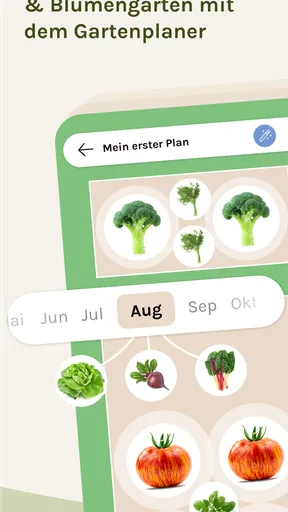
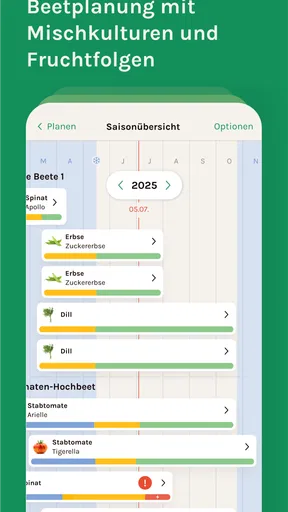
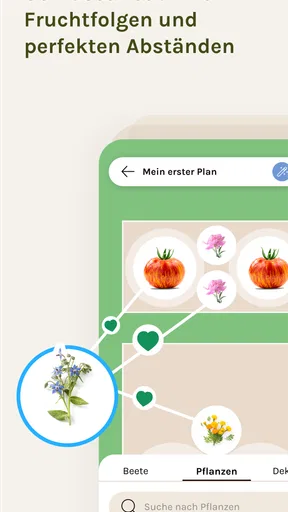
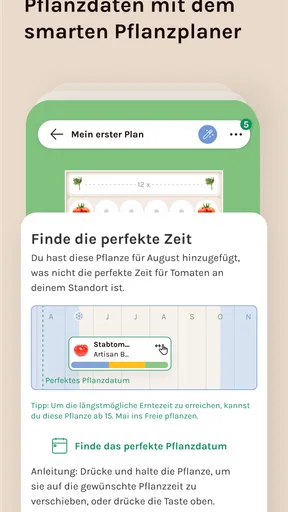
What really caught my attention was the range of features Garden Planner by Fryd offers. The app isn’t just about planting flowers; it’s about crafting an entire ecosystem. You can design plots, select plants based on your climate, and even plan crop rotations. The drag-and-drop feature makes it super easy to visualize your layout.
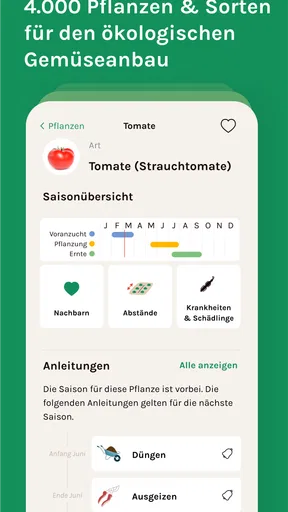
One feature that I found particularly nifty is the plant database. It’s extensive, offering detailed information about each plant, from growth patterns to care tips. It’s like having a gardening encyclopedia in your pocket. Plus, for those of us who aren’t exactly green-thumbed, the app provides seasonal reminders and tips to keep your garden thriving year-round.
Worth Reading Before You Choose

EA SPORTS FC Mobile 26 Is a Bigger Football Game, but It Takes Time

Flipboard Shows What News Apps Must Do Beyond the Feed

Switching to Android Auto Means Rethinking Your Driving Routine

Google Calendar Makes a Crowded Week Easier to Manage

Ludo King Makes the Most of the Minutes Between Plans

Baby Panda World Brings Quick Play to Modern Phones, but Its Game Library Feels Busy
These tools are especially useful together. I would first sketch the beds, then use the plant information to check whether a crop seems appropriate for its intended spot, and only then settle on a layout. A rotation plan is more valuable when I treat it as a record of what occupied each bed, not just a diagram for the coming season. That habit can help me avoid repeatedly putting the same crop in the same place, while leaving room to adjust if a planting fails or I change my mind.
There is a trade-off to any detailed digital plan: the more precise it becomes, the more effort it takes to keep it aligned with the garden. I would not try to document every tiny change while working outdoors. Instead, I’d make a clear initial plan, note meaningful changes afterward, and use the app to support the decisions that affect the whole plot. That keeps planning useful rather than turning it into another chore.
A practical workflow for the season
As someone who’s more "aspiring gardener" than "gardening guru," I found the app incredibly intuitive. I started by sketching out a rough layout of my garden. The app allows you to input the exact dimensions of your space, which was super helpful. I was able to map out where I wanted my vegetable patch, flower beds, and even a little herb corner.
The plant selection process was where I really geeked out. I spent hours exploring different plants, reading up on their needs, and placing them into my garden plan. The app’s suggestions based on my local climate were spot on. It even suggested companion plants that help each other grow—talk about teamwork!
A realistic way I’d use this is to plan on a quiet evening before a weekend trip to the garden center. I could mark the beds I actually have, list the crops I want to grow, and use the layout to spot an overcrowded idea before buying anything. I’d then check the plant details and climate suggestions, choose a manageable selection, and keep the plan open when I’m planting. It is a small change in routine, but it can prevent the familiar mistake of buying more seedlings than the available space can hold.
For a shared household garden, the plan can also make conversation more concrete. Rather than saying “let’s grow a few vegetables,” I can show where the vegetables would go and leave space for the herbs someone else wants. I’d still agree on who will water and weed; a map does not divide the work. But visualizing the same beds can make it easier to settle on a realistic plan before the season gets busy.
One tip I’d follow is to plan conservatively at first. Leave some breathing room for access and for plants to grow, rather than filling every open patch in the diagram. I’d also use the rotation feature as a prompt to think about last season’s beds, not as a reason to follow a plan blindly. A garden’s light, soil, and available time can shift the best choice, and those conditions deserve the final say.
How it compares with simpler alternatives
Compared with paper, Fryd offers a more flexible way to rearrange a bed and consult plant information while making a plan. Paper still has an advantage outdoors: it works without a screen, is easy to scribble on, and can be quicker for a tiny plot. A spreadsheet or notes app may suit someone who mainly wants a planting list or a record of dates, but it usually leaves the visual layout and plant guidance to the gardener.
More general gardening apps can be a better fit if someone wants broad care information rather than a vegetable-plot plan. Conversely, experienced growers who already track rotations, sowing dates, and harvest notes in a system they trust may not gain enough from changing tools. Fryd’s strongest case is for someone who wants those planning tasks brought together around a garden layout, rather than for every person who owns a plant.
It is also worth separating inspiration from local certainty. Climate-based suggestions can help narrow choices, but gardens vary within the same region: a warm wall, a windy balcony, or a tree’s shade can change what thrives. I would treat recommendations as a starting point, then compare them with the conditions in my own space. That keeps a helpful suggestion from becoming an unquestioned rule.
Community and reminders in everyday use
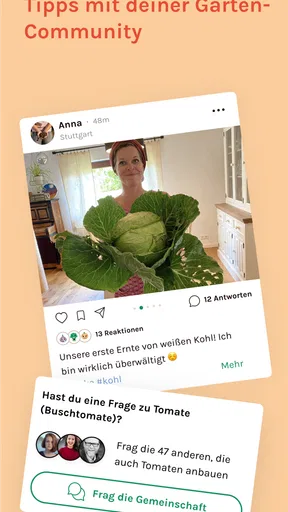
Another aspect of Garden Planner by Fryd that I love is the community feature. You can connect with fellow gardeners, share your plans, and even get advice. It’s like a social network for plant lovers. I found myself scrolling through other users’ gardens, picking up tips, and making a few friends along the way.
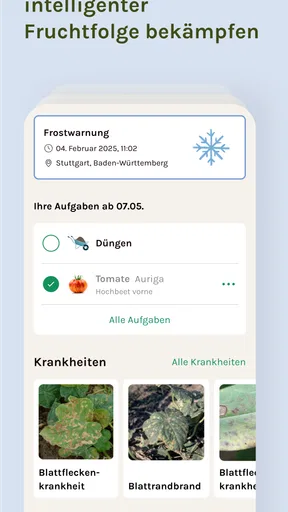
There’s also an option to link your garden plans with your calendar. This integration means you’ll never miss a planting date or forget to water your plants again. The app sends gentle reminders, ensuring your garden gets the care it needs.
I’d use reminders for jobs that are easy to overlook, such as preparing a bed or checking a planned planting window, rather than treating notifications as a complete care schedule. Watering needs can change with heat, rain, container size, and soil, so a fixed prompt should not replace a quick look at the plants. The calendar is most helpful when I enter tasks I genuinely want to remember and keep the list focused.
The community side can be useful when I want ideas from other growers, but I would weigh advice against my own conditions. A technique that works in someone else’s garden may not suit my climate, space, or experience. I’d browse for inspiration and practical perspectives, then use the plant information and my own observations to decide what to try.
When another approach is the better choice
Fryd is not the obvious choice for every growing setup. Someone with one windowsill pot may find that writing a name and watering note on paper is enough. A gardener who prefers to make decisions by walking the beds, or who already has a well-kept notebook, may find the extra planning step unnecessary. And if you want a tool that takes care of garden work for you, a planner will not remove the need to plant, observe, and respond.
The other consideration is cost. The app is free to download, but in-app purchases are available, and their listed range is broad. I would begin with the free experience and identify the specific limitation I’m trying to solve before buying anything. That is a more sensible approach than paying because a premium option sounds useful in theory. The right choice depends on whether the additional value fits a real need in your garden routine.
Switching from a paper plan or another digital system also has a small but real cost: information has to be entered again. Before moving everything, I’d start with the current beds and the crops I’m planning next, rather than rebuilding years of notes. If the layout and plant guidance genuinely help, I could add older records gradually. If not, I’d keep the existing method and avoid maintaining two competing versions of the same garden.
For a first-time vegetable grower, that gradual start matters. I’d begin with one plot and a short list of crops, then see whether the layout, plant information, and reminders make the season easier to manage. A confident gardener with a large, complex setup might want to test how well the planning process accommodates their own level of detail before relying on it. The app’s appeal is strongest when its structure reduces uncertainty rather than adding busywork.
My recommendation for home growers
After spending some quality time with Garden Planner by Fryd, I can confidently say it’s a game-changer for anyone looking to elevate their gardening game. Whether you’re a seasoned pro or a newbie like me, this app offers something for everyone. The combination of practical features, a supportive community, and a user-friendly interface makes it a must-have tool.
So, if you’re ready to transform your outdoor space into a verdant paradise, give this app a try. It might just be the green companion you’ve been looking for. Happy gardening!
My recommendation is a little more specific: I’d try it if you have a vegetable plot to organize, enjoy seeing a plan before planting, or want plant guidance and reminders alongside that plan. I’d skip it if your setup is tiny, your existing notebook already works, or you would rather garden without maintaining a digital record. For the right person, the main benefit is not a perfect-looking design; it is making a more considered choice before seeds, space, and time are committed.
Pros
- User-friendly interface for easy navigation.
- Wide variety of plants and layouts available.
- Customizable garden templates included.
- Offline mode for planning without internet.
- Regular updates with new features.
Cons
- Limited free version features.
- In-app purchases can be pricey.
- Occasional bugs in the plant database.
- Requires a modern device for best performance.
- No community sharing feature.
FAQs for Garden Planner by Fryd
What features does Garden Planner by Fryd offer?
Garden Planner by Fryd is designed to assist users in planning and organizing their gardens. It offers features such as customizable garden layouts, plant databases with detailed information, and seasonal planting guides. Users can also track plant growth, set reminders for watering, and access design templates to suit various garden types.
Is Garden Planner by Fryd suitable for beginners?
Yes, Garden Planner by Fryd is user-friendly and suitable for both beginners and experienced gardeners. It provides easy-to-understand tutorials and guides, making it simple for new gardeners to start planning their gardens. The intuitive interface helps in quickly learning how to make the most out of the app’s features.
Can I use Garden Planner by Fryd offline?
Garden Planner by Fryd requires an internet connection for initial setup and downloading plant databases. However, once the necessary data is downloaded, many features can be used offline. This allows users to plan and manage their gardens without needing constant internet access, a convenient feature for outdoor use.
Does Garden Planner by Fryd include a plant database?
Yes, Garden Planner by Fryd includes an extensive plant database that provides detailed information on a wide variety of plants. Users can search for plants by name, type, or climate suitability, and access information on growth habits, care instructions, and ideal planting times, making it a comprehensive resource for garden planning.
Is Garden Planner by Fryd available for both Android and iOS devices?
Garden Planner by Fryd is available on both Android and iOS platforms. Users can download the app from the Google Play Store or the Apple App Store, ensuring compatibility across a wide range of devices. This cross-platform availability makes it accessible to a broader audience of gardening enthusiasts.


